From Blocks to Shots: LTX Layout to Render Turns Gray Geometry Into Finished Video
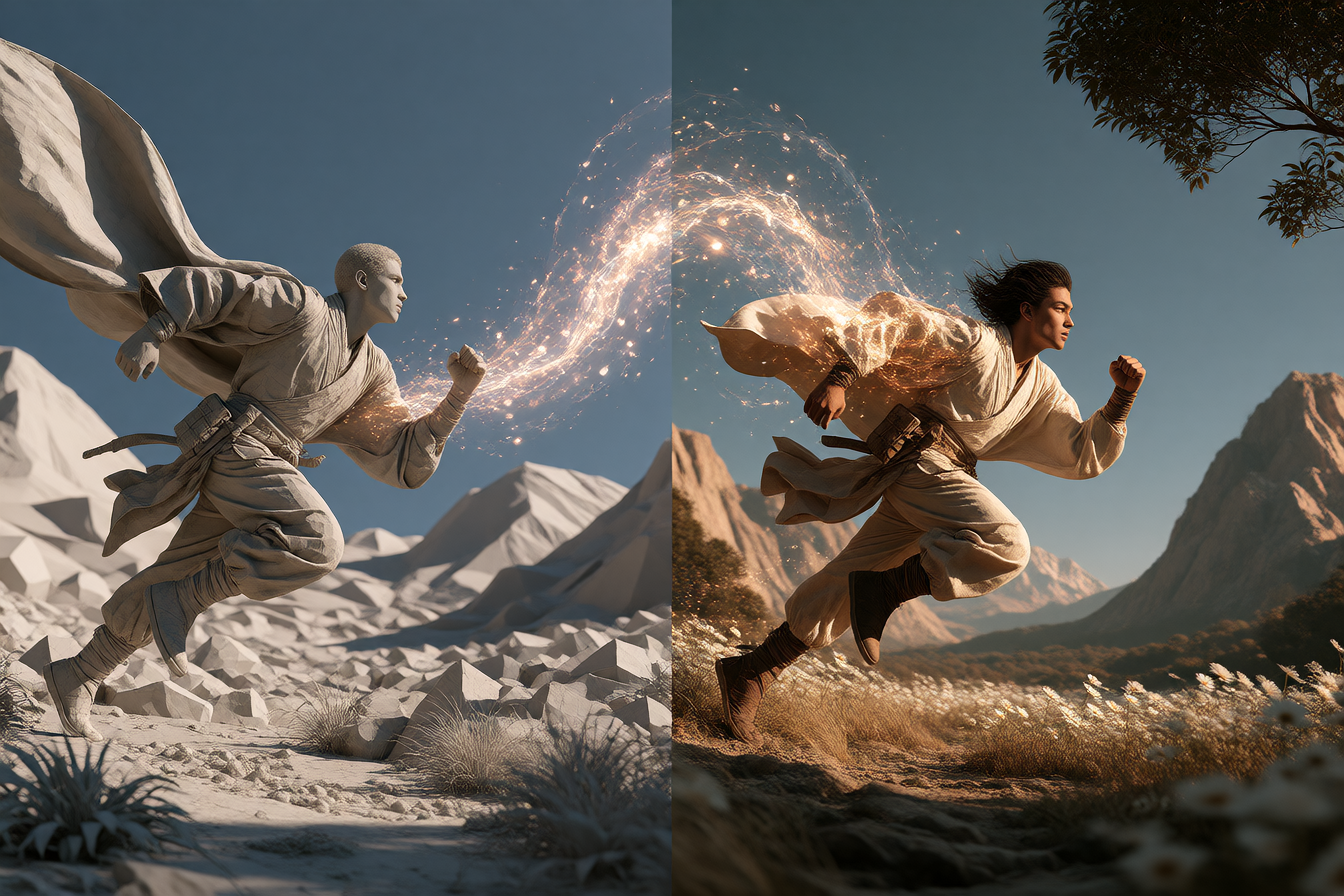
If you spend your days building gray blockouts in Blender or staring at playblasts in Unreal, LTX has a new feature that could save you from the render farm queue. Layout to Render turns a rough 3D viewport animation straight into polished, finished video—keeping your camera move, composition, and object placement locked down while the AI handles lighting, texturing, and detail.
The feature launched this week as part of LTX-2.5, Lightricks' open-weight video model. It's a shift in how AI video generation works. Instead of describing a cinematic scene in words and hoping the model understands your camera choreography, you build your geometry and camera path in the tools you already know, and let the model handle the expensive part: look development.
What people are making with it
The reference examples show the workflow in action. A blocky animated camera move through simple shapes becomes a finished, cinematic shot with dynamic lighting. A detailed clay render in Blender gets transformed into a fully textured, graded scene while the camera and composition stay true to the original.
On Hugging Face, the Layout to Render IC-LoRA is openly available, and filmmakers and game developers are already testing it. The LoRA works with LTX-2.5-22B and can take input from any 3D tool—Blender, Unreal, game engines. A clay render works. A blocky playblast of simple shapes works just as well.
fal also released a 3DREAL LoRA earlier this year that does similar work, and filmmakers used it to produce a complete 1930s-style chase short where every shot started as a Blender blockout. The Strong v2 variant adds multi-scene coherence so a single clip can handle shot changes, plus audio generation for dialogue scenes.
What's actually good (and what isn't)
The real strength here is iteration speed. You're not waiting hours for a render to see if your framing works or if the lighting reads right. Generate, check, adjust the blockout, generate again. That's powerful for pre-visualization, shot planning, and proof-of-concept.
The catch: these are AI-generated shots. LTX-2.5 as a whole can still struggle with complex multi-person scenes and precise details. Layout to Render keeps your composition locked, which is the whole point, but the detail work relies on what the base model can handle. For simple, dynamic shots—camera moves through environments, character blocking, architectural reveals—it shines. For intricate facial work or dense crowd scenes, you'll likely still want traditional rendering or human touch-ups in compositing.
The good news: outputs come out as EXR with HDR support and ProRes, ready for grading and compositing. You're not locked into the AI's final color or contrast. The output is designed to sit inside a professional post-production pipeline, not replace it.
How to try it
LTX-2.5 is open-source and can be run locally in ComfyUI if you have the hardware. The LTX Layout to Render LoRA is a separate download, trained on top of the base model.
If local isn't your style, LTX Studio and Lightricks' web app offer hosted versions on a credit basis. Keep in mind that content uploaded to the web app may be used to train future models.
For a taste of the pipeline, start with a simple animated blockout—even just basic shapes with a camera move. Frame count gets snapped to 8×k+1 (so a 72-frame clip becomes 65), which is a quirk worth knowing upfront. Detailed clay renders work, but blocky geometry works just fine too.