Halo: Make AI Art by Talking Instead of Typing
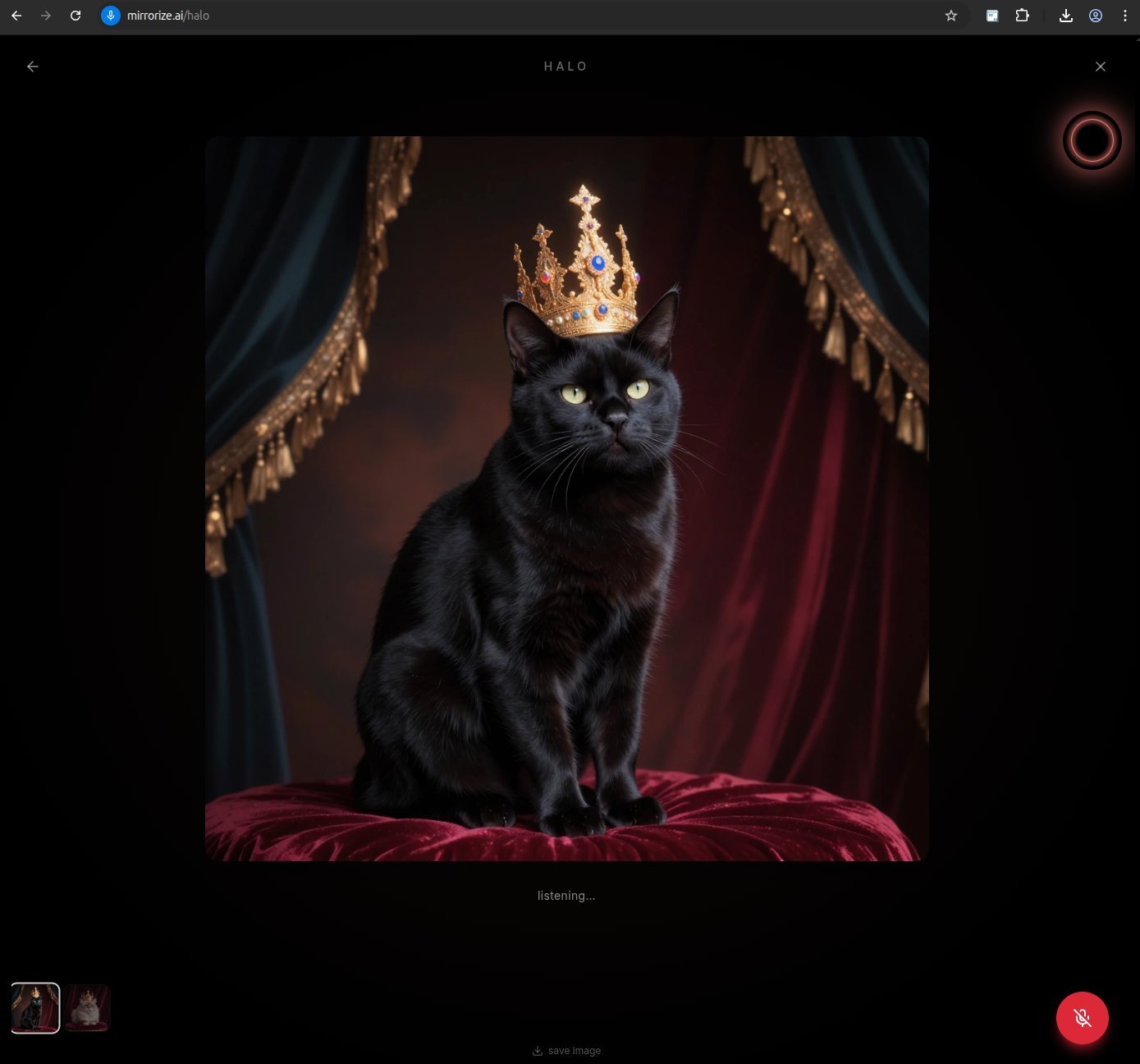
Talk, Don't Type: Halo Brings Voice to AI Creation
Most AI tools still feel like filling out a form. Type your prompt. Pick your settings. Hit generate. Wait. Repeat. It works, but it's not exactly creative flow.
Mirrorize just changed that with Halo — a voice-powered AI creative partner that lives inside AI Studio. Instead of typing prompts, you just talk. Halo listens, generates images, creates music, remembers your style across sessions, and posts to your feed — all through conversation.
It's available now for Pro users as an early beta feature.
What Halo Does
Halo is an AI you speak to out loud. Tap the glowing orb in AI Studio, describe what you want, and Halo responds with both voice and action.
Instead of typing: "cyberpunk city, neon reflections, rain, high angle, cinematic"
You say: "Show me a rainy cyberpunk city at night, lots of neon, looking down from a rooftop."
Halo picks the right model, chooses an aspect ratio, writes a detailed prompt, and starts generating. When the image appears, you keep talking: "Darker. More fog. Try it as a painting." Halo adjusts and regenerates. The time from thought to new image collapses.
But Halo doesn't just make images.
She generates music too. Say "make me something lo-fi and warm" and Halo creates a soundtrack on the spot. It plays back at low volume so you can keep talking over it. Ask for "something darker, more cinematic" and she'll make another track. All powered by ElevenLabs' music API.
She remembers you. Halo shares memory with Q (Mirrorize's text-based AI). If you told Q yesterday that you prefer dark moody aesthetics, Halo already knows. If you tell Halo you're working on a dragon series, Q will know next time you chat. One mind, two surfaces. Your preferences, your name, your current projects — they carry across every session.
She posts for you. When you're happy with a result, just say "post that" and Halo puts it on your Mirrorize feed. Dictate a caption or let it go without one.
How It Works in Practice
The interaction is simple:
Tap the orb — Halo activates and listens. The orb glows warm gold, pulsing gently.
Speak your idea — describe what you want in plain language. No prompt syntax, no keywords.
Halo responds — she talks back, explains what she understood, and starts creating.
Image appears — behind the orb, your creation fades in. The orb shifts color to match what was generated.
Keep going — give feedback, try variations, switch to music, or post your favorites.
The orb is more than decoration. It's real-time feedback. When you're speaking, it reacts to your voice — bass frequencies stretch it horizontally, treble stretches it vertically. When Halo is speaking back, the same thing happens with her voice. When she's generating, particles converge inward. When the image lands, they burst outward. The room itself — background glow, ambient light — shifts to match the colors of what you just created.
It makes the AI feel present.
What Halo Picks for You
Part of what makes voice creation work is that Halo handles the technical decisions:
Models. Halo defaults to Cosmic but picks based on vibe. She knows Warped for surreal work, Nero for illustration, Simulation for photorealism. You can override by name: "use Simulation for this one."
Aspect ratio. Say "portrait" and she goes 9:16. Say "cinematic" and it's 16:9. Say "poster" and she picks 3:4. Or just describe the scene and let her infer it.
Music. Tell her a mood, genre, or vibe. "Lo-fi hip hop, warm piano, 85 BPM" or just "something chill." She generates 15-120 second tracks, instrumental by default. Ask for vocals and she'll include them.
You don't need to know model names or technical settings. Just describe what you're imagining.
Why Voice Changes the Process
Typing forces you to plan. Voice lets you discover.
When you type a prompt, you think in keywords — you're optimizing for the model. When you speak, you think in ideas — you're describing what you actually see in your head.
Voice also makes iteration dramatically faster. Instead of selecting text, editing words, and re-submitting, you just say "bigger crown" or "underwater instead" or "warmer light." Thought to new image in seconds.
And critically: you can look at your images while you create. With typing, you're staring at a text box. With voice, you're watching the canvas while you describe what should change. That feedback loop is tighter and more natural than any text interface.
The Memory Thing
This is subtle but important. Most AI tools treat every session as a blank slate. Halo doesn't.
Halo and Q share the same memory system. Observations get extracted from your conversations automatically — things like "prefers to be called Mirror" or "working on a cyberpunk cat series" or "likes dark moody aesthetics." These aren't explicit settings you configure. They're things Halo picks up naturally from talking to you.
Next time you start a session, those memories load silently. Halo doesn't announce them. She just acts like someone who knows you. If you've been generating cats all week, she might suggest a new angle. If you told her your name last time, she uses it this time.
One consciousness across two surfaces — voice (Halo) and text (Q). Whatever you tell one, the other knows.
Current Limitations
Halo is in early beta. Here's what to expect:
No video generation yet. Image and music only for now. Video support through MVG and PixVerse is coming.
No image editing. You can't say "make the sky more purple" on an existing image yet. That's on the roadmap.
Model selection is basic. Halo knows four models well. The full library of 50+ models isn't wired up yet — she'll learn more over time.
Music plays quietly. Since Halo is voice-first, music auto-plays at low volume so it doesn't interfere with the conversation. You can pause, resume, and download tracks.
None of these break the experience. The core loop — talk, create, iterate, post — works now.
Who This Is For
Halo makes the most sense if you're:
- Exploring ideas — you want to test concepts without stopping to write prompts
- Working visually — you'd rather look at your canvas than at text fields
- New to AI art — you don't know all the models yet and you'd rather just describe what you want
- Iterating fast — you're trying lots of variations and want to stay in flow
- Want background music — you're creating content and need a soundtrack to match
If you already have a precise workflow with saved prompts and specific model combos, you might not need voice. But if you've ever wished you could just tell the AI what you're picturing, Halo delivers that.
How to Try It
Halo is available now for Pro subscribers ($9.99/month) in AI Studio.
Look for the gold ring icon in AI Studio's toolbar, or find Halo in the sidebar navigation on desktop. Tap it, allow microphone access, and start talking.
The feature uses your existing Glass credits for image and music generation — same costs as manual creation. The voice interaction itself doesn't cost extra.
Try it at mirrorize.ai/halo