New AI Art Generators Make Spring, Summer, Fall & Winter Images
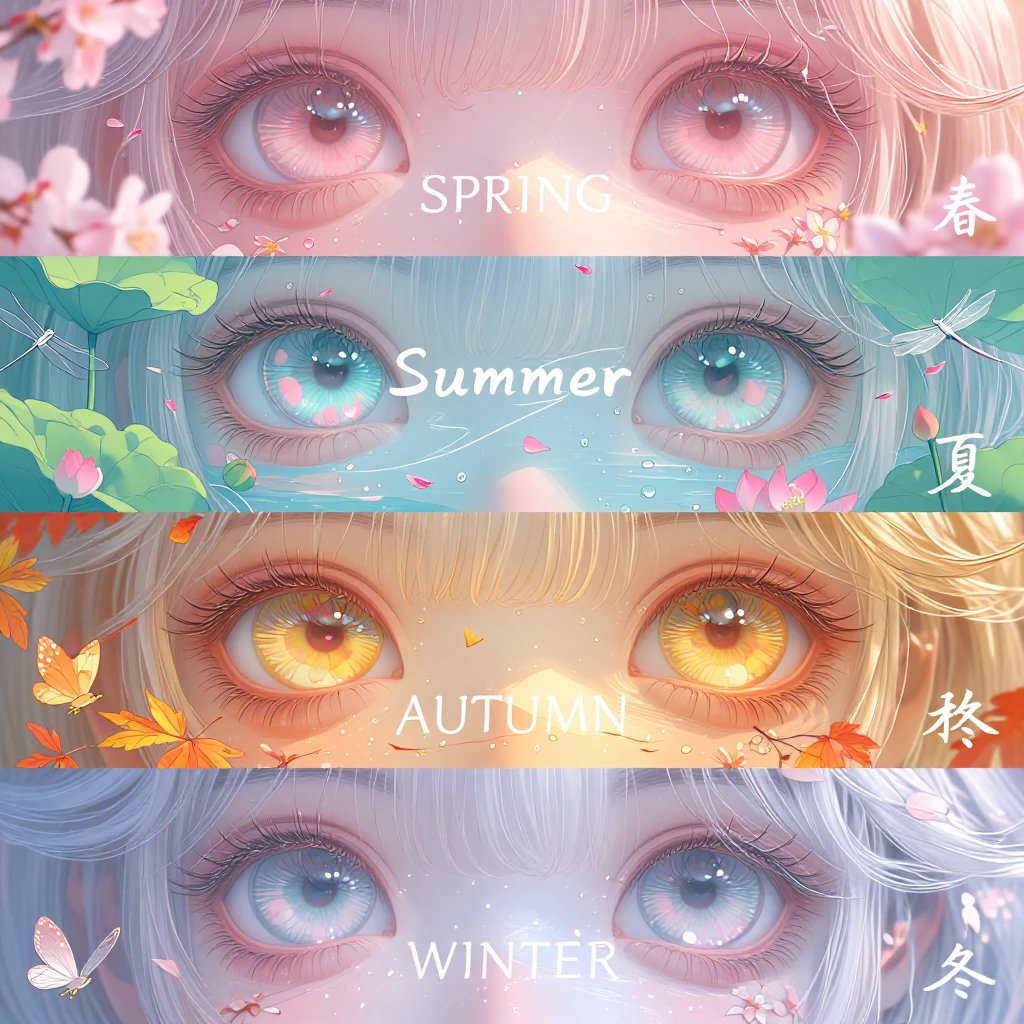
Mirrorize Launches Seasonal AI Art Generators — Four Distinct Styles for Every Time of Year
Creating AI art with the right seasonal feel used to mean wrestling with your description until you hit the right mood. Too warm for winter. Too cold for summer. Never quite capturing that specific autumn glow.
Mirrorize just solved that problem with their Seasonal Collection — four dedicated image generators, each trained to nail a specific season's aesthetic. Spring launched this week, completing the set alongside Autumn, Winter, and the upcoming Summer generator.
These aren't just filters slapped on top of existing tools. Each seasonal generator produces images with fundamentally different visual DNA. And for anyone who's spent hours trying to prompt their way into "that exact spring light," the difference is immediately obvious.
What Makes Each Season Different
Autumn takes a traditional Eastern anime approach — think warm oranges, deep reds, classic anime styling with a nostalgic edge. It's the cozy, golden-hour season rendered in hand-drawn aesthetics.
Winter flips the script entirely with a modern 3D look. Clean lines, contemporary feel, colder tones. This one's built for crisp, sharp images that feel like high-end CG work rather than illustration.
Spring (the newest addition) goes bright and vibrant. It's clearer and lighter than the others, with fresh energy baked into every generation. If Autumn is golden hour, Spring is midday in full bloom.
Summer is coming soon and will complete the four-season lineup. Based on the pattern, expect something distinct from the other three — probably leaning into heat, saturation, and peak daylight aesthetics.
The smart part: these generators actually understand seasonal lighting, weather, and atmosphere without you having to explain it in your prompt. Type "a park bench" into Spring and you'll get dappled sunlight through new leaves. Same prompt in Winter and you get frost and low-angle light.
How to Use Seasonal Generators on Mirrorize
All four seasonal generators live in Mirrorize's image generation studio under the MV4 collection. They're free for Pro subscribers and cost a small amount of credits for free users — making them accessible for testing without burning through your budget.
The workflow is dead simple:
- Open the Image tab in AI Studio
- Pick your seasonal generator from the dropdown
- Write your prompt (keep it straightforward — the generator handles the seasonal mood)
- Choose your aspect ratio and resolution
- Hit generate
The real power move: stack styles on top. Mirrorize lets you combine up to three styles from their library of 100+ options with any generator. So you can take Spring's bright aesthetic and add Film Grain + Golden Hour for a vintage summer camp photo look. Or pair Winter with Frozen + Cinematic for a high-budget fantasy film vibe.
The style system is intelligent — it positions your chosen styles in the right place automatically. Composition styles (like Dutch Angle or Wide Shot) go first, textures wrap the middle, moods finish it off. You don't have to think about prompt structure.
Why Seasonal Aesthetics Matter More Than You Think
Seasonal mood isn't just about adding snow or leaves. It's light temperature, atmosphere density, color relationships, shadow behavior — dozens of subtle cues your brain reads as "this is definitely winter" or "this is peak summer."
Traditional AI image generators force you to describe all of that manually. You end up writing prompts like "warm golden afternoon light, late autumn, soft shadows, orange and red leaves, cozy atmosphere" and hoping the AI interprets it correctly. Half the time it doesn't quite land.
Mirrorize's seasonal generators bake that understanding in. Your prompts get shorter and more focused on the actual subject. The seasonal atmosphere just... happens.
This matters especially for:
- Character art — seasonal lighting dramatically changes skin tones and fabric appearance
- Landscape work — each season has signature sky colors and vegetation states
- Product photography — seasonal context sells products (winter gear in snow, summer items in bright sun)
- Storytelling — time of year carries emotional weight automatically
Stacking Seasonal Generators with Video
Here's where it gets interesting: every image you generate can be animated directly from the gallery.
Click any image from your seasonal generations, hit the Animate button, and it loads straight into Mirrorize's video tab with your image pre-filled. Choose PixVerse v6 for highest quality (5, 10, or 15 seconds) or MVG for budget-friendly animation.
The seasonal aesthetic transfers into the animation. A Spring image keeps its bright, fresh energy as it moves. A Winter scene maintains that crisp 3D look through the motion. This is huge for anyone building seasonal content campaigns or just experimenting with living artwork.
Video costs credits — PixVerse v6 runs 15/25/40 credits for 5/10/15 seconds, MVG costs 25/40/60 credits. But the ability to see your seasonal image actually breathe and move? Worth testing.
The Bigger Picture: Generator Diversity
Mirrorize now has 50+ image generators across multiple collections. The Seasonal set joins MV4 powerhouses (Stellar, Singularity, Gravitron), beloved MV2 classics (Proximity remains the community favorite for cinematic intimacy), and specialized tools for illustration, anime, and commercial work.
Each generator has a distinct personality. Proximity makes moody, close-up scenes. Stellar excels at epic landscapes. The seasonal generators own their specific atmospheres.
This diversity matters because AI art isn't one-size-fits-all. The right tool for a winter fantasy scene isn't the right tool for a summer product shot. Having seasonal-specific generators means picking the right starting point instead of fighting your description.
Try Seasonal Generators on Mirrorize
Spring is live now alongside Autumn and Winter. Summer's dropping soon to complete the collection.
If you're a Pro subscriber ($9.99/month), all MV generators including the seasonal set are unlimited. You also get 400 credits monthly for video generation and commercial tools.
Free users can test seasonal generators for a small credit cost per generation — enough to experiment and find which season matches your creative direction.
Head to mirrorize.ai, open AI Studio, and pick a season. Write something simple like "a coffee shop" or "someone reading a book" and watch how dramatically the seasonal choice changes the result. Then try stacking a style or two on top. Then animate it.
The tool that knows what spring actually looks like is already more useful than a prompt that tries to explain it.