One Render Zero Edits: A 15-Second Biker Bumper in Seedance 2.0
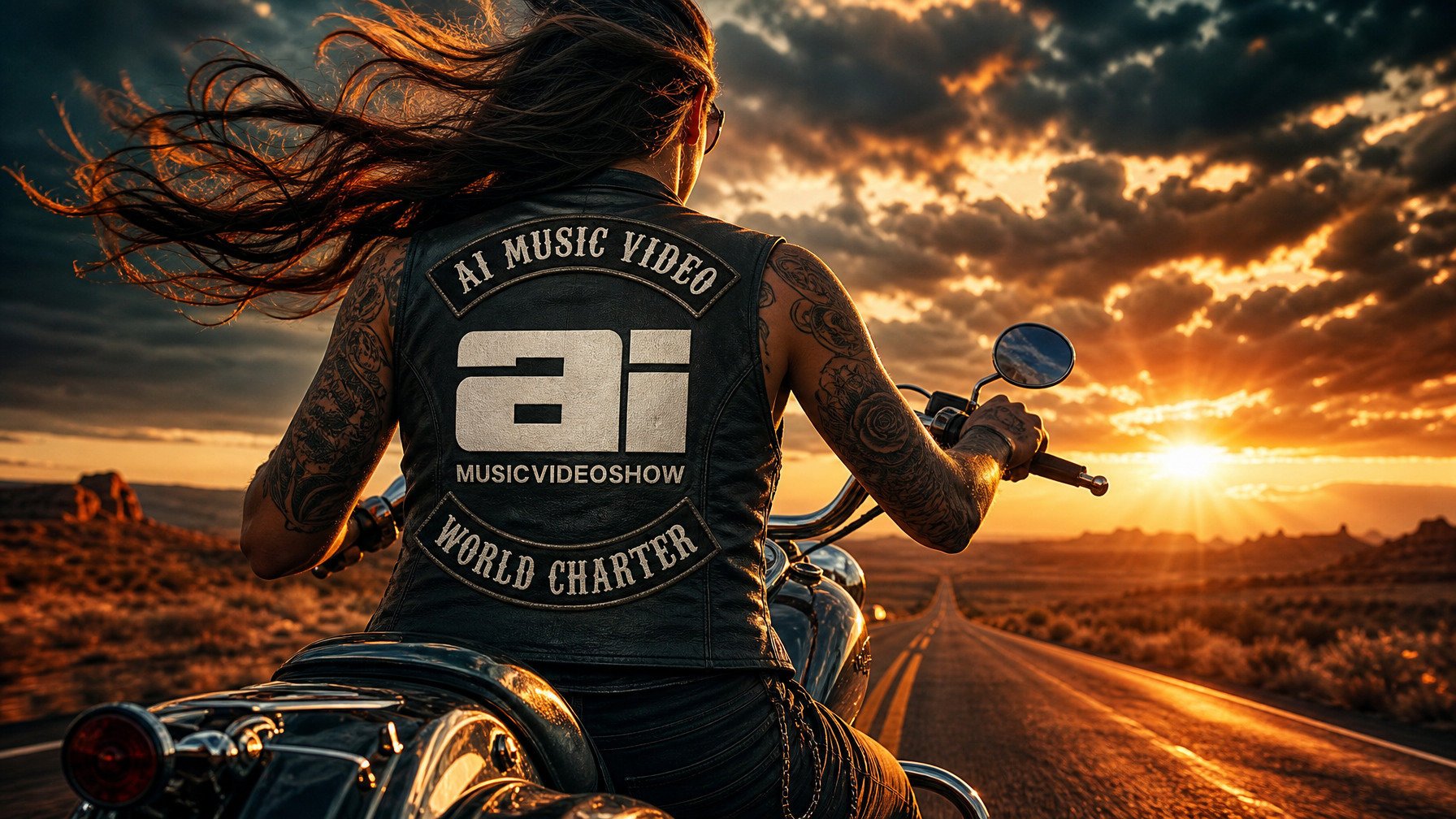
How I built a full network bumper with aerial, detail shots, a smiling reveal, and an in-camera logo drop, in a single Seedance 2.0 generation. No timeline. No compositing. First try.
The finished 15-second bumper. Everything you see came out of one render.
Most people assume a logo reveal has to be faked in post production, generate the footage, then mask in the real logo back at your editor. I wanted to skip that entirely: one Seedance prompt, the logo rendering live on the back of the vest, no edit step at all.
It worked on the first take. Here's exactly how, and how you can do it with your own brand.
The trick that made it work
Seedance 2.0 is bad at inventing text. Ask it to render "AI MUSIC VIDEO / WORLD CHARTER" across a leather vest from a text description and you'll get smeared, garbled patch art every time. That's the single reason logo reveals usually get pushed to post.
So I didn't ask it to invent anything.
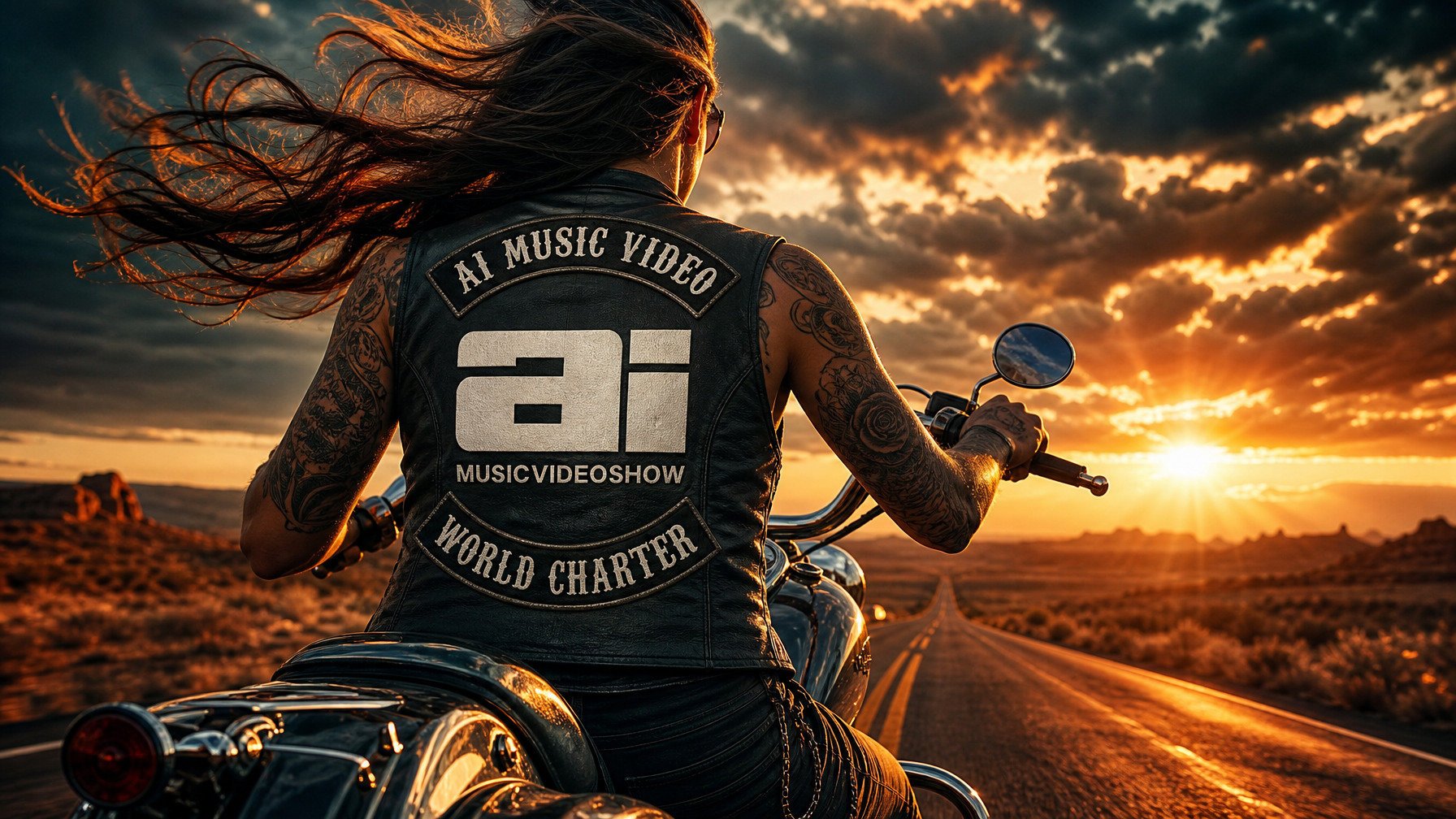
I built the logo onto the vest as a still image first a finished hero shot of the rider from behind, logo already in place, lit the way I wanted the reveal to look. Then I fed that image into the render as a reference. Now Seedance isn't generating a logo from scratch; it's copying a logo it can already see. Completely different success rate.

The secret sauce: I made this still first, logo composited onto the vest, desert sunset, the exact framing I wanted to reveal. Seedance copies this instead of guessing.
That's the whole concept. Make the money shot as a still, then let the video model reference it. Swap in any logo, any jacket, any brand mark, the method is the same.
What you need
Reference images. (you might need more or less depending on your video)
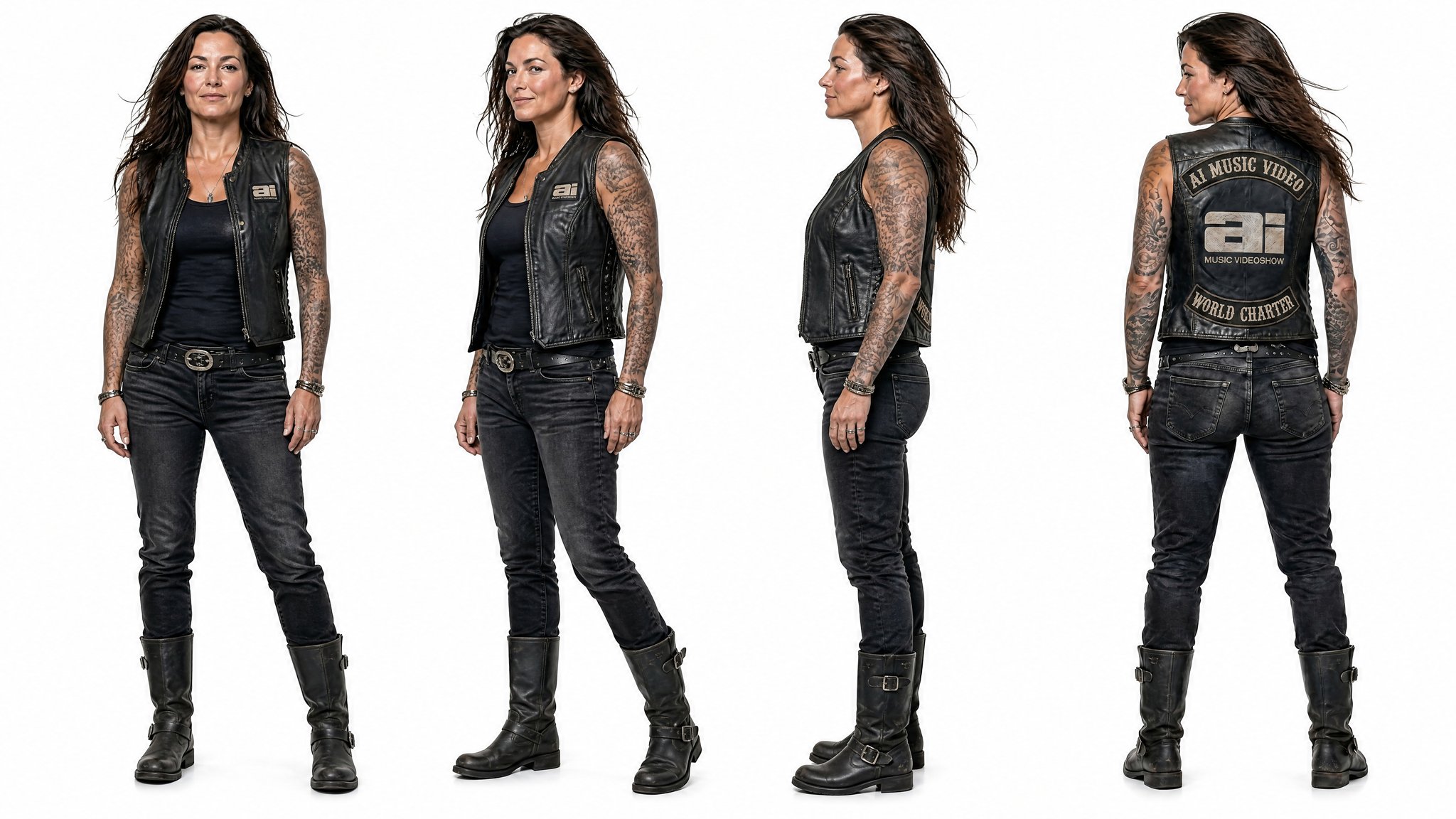
A character reference of woman
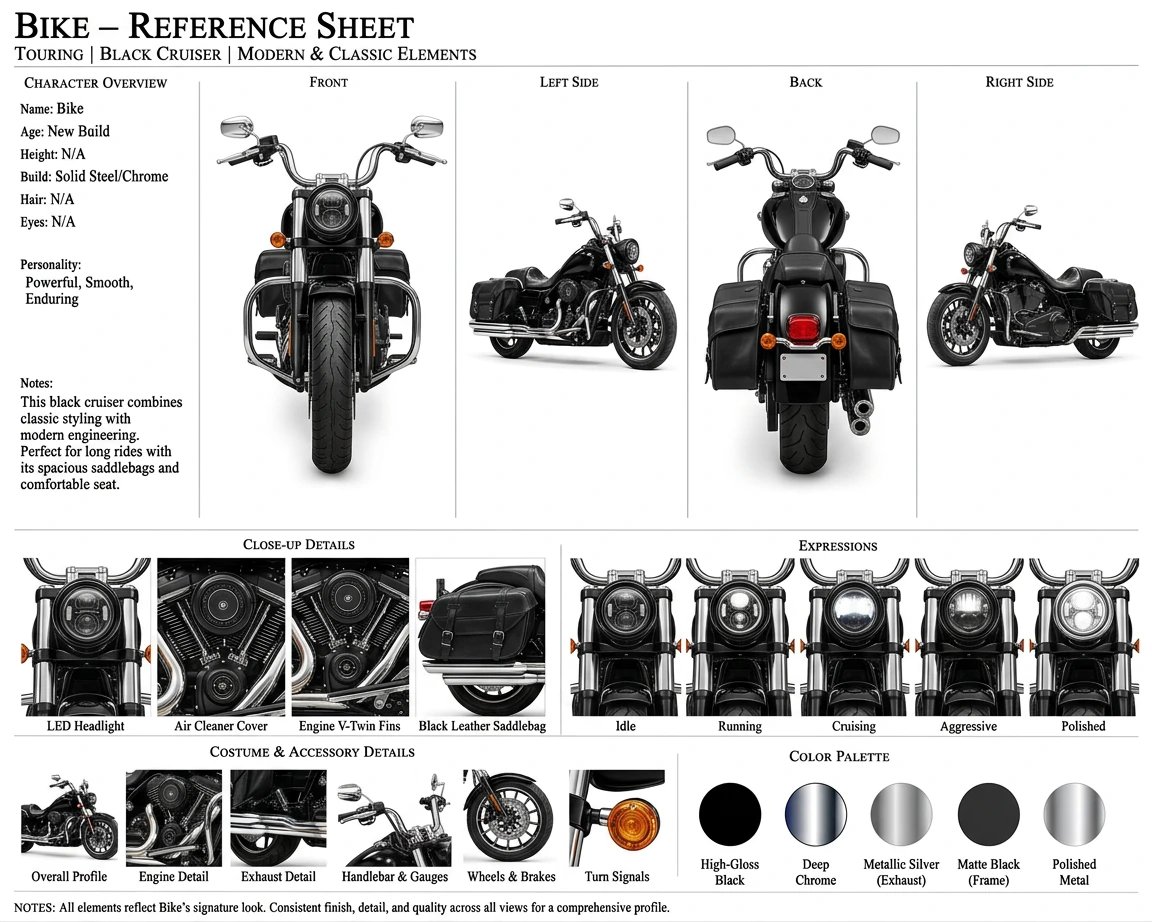
A character reference of motorcycle
| Slot | Image | Job |
|---|---|---|
| @Image1 | Rider | Locks her face and identity |
| @Image2 | Bike | Locks the motorcycle |
| @Image3 | Pre-built logo still | Locks the sunset look and the logo for the reveal |
No music track, no dialogue this runs on native sound effects (Harley engine + wind).
The prompt
Paste this straight in or customize it to fit your needs. Seven labeled beats land at roughly two seconds each on their own don't add timestamps, they break the model. The back of the vest only appears at Shot 6, so the logo stays hidden until the reveal.
Define the woman with long dark wavy hair, tattooed arms, dark sunglasses, and a black leather vest over a black tank top in @Image1 as Raven. Use @Image2 as the motorcycle reference: a black touring cruiser with chrome accents, a V-twin engine, and leather saddlebags. Use @Image3 as the scene reference for the golden-hour desert highway and for the exact look of Raven's vest from behind.Shot 1: High aerial bird's-eye view looking straight down as the black cruiser rides along an empty two-lane desert highway, the road cutting a thin line through red rock and scrub. The camera holds high and wide. <deep Harley V-twin engine rumbling in the distance, steady wind>.
Shot 2: Low-angle lateral tracking shot at road level as Raven rides past the camera from left to right, front three-quarter view, hair streaming behind her, the cruiser's chrome catching the low sun. The camera tracks alongside her. <throaty Harley exhaust note, rushing wind>.
Shot 3: Extreme close-up of Raven's right hand gripping the chrome handlebar, thumb resting near the throttle, the round chrome mirror in soft focus behind it reflecting the desert road. The camera holds steady. <engine rumble building, wind buffeting>.
Shot 4: Extreme close-up of the rear tire spinning over sun-cracked asphalt, the painted center line streaking past beneath it. The camera locks low on the moving tire. <tire hum on hot asphalt, deep engine drone, wind>.
Shot 5: Tight close-up of Raven's face at a three-quarter angle, dark sunglasses reflecting the sunset, wind moving her hair. A slow, easy smile spreads across her lips. The camera holds close on her face. <wind, low steady engine rumble>.
Shot 6: Cut to directly behind Raven, framed square on the back of her black leather vest as she rides toward the sunset. The vest back and its embroidered patches match @Image3 exactly, sharp and centered in frame, with golden light flaring around her shoulders. The camera holds steady on the vest back. <steady Harley rumble, wind>.
Shot 7: The camera pulls back and up, away from Raven, as she rolls the throttle and accelerates down the long straight highway toward the setting sun, the bike shrinking into the golden haze. <engine surging louder as she accelerates, rising wind, exhaust roar>.
The entire video should have a hyper-photorealistic cinematic style, anamorphic widescreen 16:9, shallow depth of field, warm golden-hour desert palette with long shadows and lens flare, natural smooth motion with no stutter or flicker. Raven's face remains stable throughout with no deformation, no face swap, and no identity drift. Keep only a single Raven and a single motorcycle in frame at all times; do not generate duplicate or twin riders or bikes.
Keep it subtitle-free. Do not generate any text or subtitles. Do not generate a watermark. Do not generate any logos other than the one from @Image3.
Why it's built this way
A few decisions doing quiet work:
- Every character gets defined once, then named.
Define ... as Raven, then only "Raven" after that. This is what stops her face from drifting between cuts.
- One camera move per shot. Aerial holds, Shot 2 tracks, the close-ups lock off, the ending pulls back. Stacking moves in a single beat makes the motion stutter.
- Sound effects go in angle brackets —
<Harley rumble, wind>. No music, no dialogue, so the model builds the whole soundscape natively.
- The logo constraint names the source. "Do not generate any logos other than the one from
@Image3" tells it the reveal patch is intentional and where to get it.
- Reveal is held to Shot 6. The build never shows her back, so the payoff stays a surprise.
Make it yours
The structure is a template, not a one-off. Keep the seven-beat rhythm establish, detail, detail, face, reveal, exit and swap everything else: a skater, a chef, a DJ, a race car. Wherever your brand mark lands, build that frame as a still first, then reference it for the reveal. That one move is the difference between a clean in-camera logo and an afternoon in your editor.
If a take ever smears the patch, re-roll rather than reaching for post and make the Shot 6 reference line more literal (reproduce the vest back from @Image3 exactly). Mine landed first try. Yours can too.
When you are happy with your work upload the bumper to AI Music Video Show